
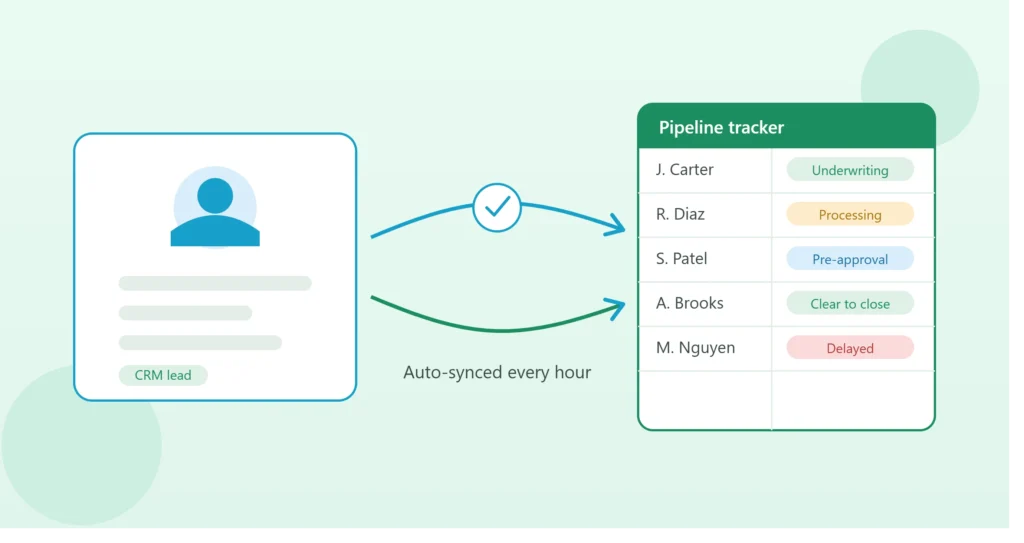
If you use Bonzo to manage leads and communication, there’s a good chance you’re also keeping a separate Excel sheet for reporting, forecasting, or sharing pipeline status with your team. The problem most brokers run into isn’t a lack of tools — it’s that those two systems don’t talk to each other. Someone ends up manually re-typing loan stages, contact details, and notes from Bonzo into Excel, usually once a week, usually a little out of date by the time it’s shared.
A Bonzo CRM and Excel integration solves this by keeping your spreadsheet automatically in sync with what’s actually happening in your CRM — no copy-paste, no “let me update that and send it over.”
Why Keep Excel at All If You Already Have Bonzo?
This is a fair question, and the answer usually comes down to flexibility. Bonzo is built for lead management and communication — it’s not designed to be a flexible reporting or forecasting tool. Excel, on the other hand, is where most brokers build:
- Custom pipeline dashboards
- Volume and revenue forecasts
- Reports formatted for lenders, partners, or leadership
- Ad-hoc analysis that a CRM’s built-in reports don’t cover
Rather than choosing one system over the other, syncing them means Bonzo stays your source of truth for lead activity, while Excel becomes a live, always-current reporting layer built exactly the way you need it.
How the Sync Actually Works
There are a few different ways to connect Bonzo and Excel, depending on your technical comfort level and how “live” you need the data to be.
1. Bonzo’s native export + scheduled refresh Bonzo allows manual exports of your contact and pipeline data. On their own, exports are still a manual step — but combined with a simple automation tool, this export can be triggered and pulled into Excel or Google Sheets on a schedule (daily or hourly) without anyone touching a button.
2. API-based integration Bonzo offers API access, which allows a more direct, real-time connection. With the right setup, changes made in Bonzo — a lead moving to “Application Submitted,” a new contact being added, a stage update — can flow into your Excel sheet automatically, often within minutes.
3. Zapier or similar automation platforms For brokers who want this without custom development, tools like Zapier can watch for specific triggers in Bonzo (new lead, stage change, tag added) and automatically update a connected Google Sheet or push data into Excel via an intermediate step. This is usually the fastest way to get a working sync without writing code.
What You Can Automatically Sync
Depending on the method used, a Bonzo-to-Excel integration can typically keep the following updated without manual entry:
- Borrower name and contact details
- Current pipeline stage
- Loan officer assigned
- Last activity date
- Tags or lead source
- Notes or custom fields
Once this data flows automatically, your Excel dashboard (like the pipeline tracker structure covered in our other article) updates itself — the “Days in Current Stage” calculations, the conditional formatting flags, the pivot table summaries — all reflecting real, current data from Bonzo.
A Simple Example
Imagine a loan moves from “Processing” to “Underwriting” inside Bonzo. Without a sync, someone has to remember to update the spreadsheet too — and on a busy day, that update might not happen for 24–48 hours.
With an automated sync in place, that stage change is picked up and reflected in the Excel tracker automatically, often within the hour. Anyone looking at the spreadsheet — including people who don’t have Bonzo access, like a lender partner or an assistant — sees accurate, current information without needing to ask.
Common Pitfalls to Avoid
Building a one-way sync only. Some setups only pull data from Bonzo into Excel, which is fine for reporting but won’t work if your team also updates statuses directly in the spreadsheet. Decide early whether the sync needs to be one-directional or two-directional, since the second is more complex to build correctly.
No error handling. APIs occasionally fail, rate-limit, or return unexpected data. A sync that silently breaks is worse than no sync at all, because everyone assumes the data is current when it isn’t. Build in a simple check — like a “last synced” timestamp visible on the sheet — so it’s obvious if something has stopped updating.
Overcomplicating the first version. It’s tempting to sync every possible field on day one. It’s usually more reliable to start with the handful of fields that actually drive your reporting (stage, name, dates, assigned officer) and expand later once the core sync is stable.
Ignoring field mapping. Bonzo’s field names won’t always match your spreadsheet’s column headers. Mapping these correctly up front avoids a sync that technically works but populates the wrong columns.
When This Is Worth Setting Up
If you’re currently updating a pipeline spreadsheet by hand from Bonzo — even once a week — that’s usually a sign the integration will pay for itself quickly. The time saved isn’t just the data entry itself; it’s also the reduced risk of outdated numbers being shared in a report, a team meeting, or a lender update.
For a solo broker with a light pipeline, a manual weekly update might genuinely be fine. But for a growing team, or anyone managing more than a handful of active loans at once, a live Bonzo-to-Excel sync usually becomes less of a convenience and more of a necessity.
If you’d like this set up for your own pipeline — connecting Bonzo (or GoHighLevel, Zapier, or another CRM you use) directly to a custom Excel or Google Sheets dashboard — book a free 15-minute call and we can map out exactly what your sync should look like.